

 English
 Русский
 Turkish
 Português (Brasil)
 한국어
한국어 العربية
 Español
 ไทย
ไทย Tiếng Việt
 Français
 中文
中文 Deutsch
 Bahasa Indonesia
 Italiano
 Polski
 Українська
 فارسی
فارسی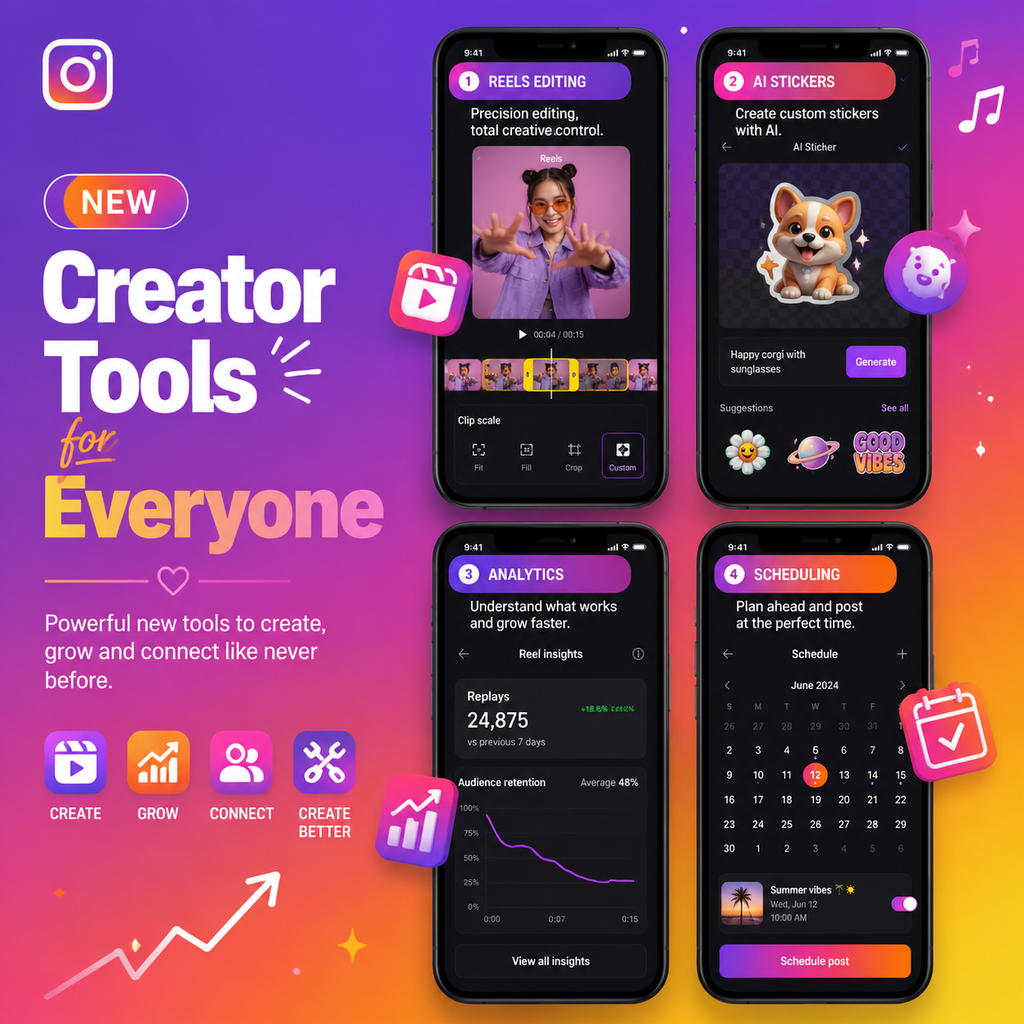
Instagramが競争を平等に:クリエイターツールをすべての人に
Instagramが門戸を開きました。かつてはメガインフルエンサーだけが使えていたツールが、今ではすべてのクリエイターが利用可能になり、プラットフォームの民主化が進んでいます。この変化により、ブルーチェックマークを待たずに、高度な編集機能、パフォーマンスインサイト、クリエイティブなオプションにアクセスできるようになりました。重要なのは?大胆に実験することです。成功は、たった一つの新機能の先にあります。
これらのアップデートには、クリップのスケーリング、トリミング、回転、元に戻す/やり直し機能を備えた改善されたReels編集が含まれます。また、ナレーションツールと新しいテキスト読み上げボイスも展開されており、コンテンツにプロフェッショナルなエッジを加えます。
注目の新しいクリエイティブツール
カスタムステッカーがテスト中で、写真や動画をAIを使ってユニークなステッカーに変換できます。さらに、Instagramは写真フィルターとカルーセル編集をリフレッシュし、完璧なムードを設定できるようにしています。ネイティブのスケジュール機能と下書き管理もアップグレードされ、事前にコンテンツを計画しやすくなります。
Reelsの再定義:新しい指標と音楽同期
Reelsは引き続き発見の主役です。Instagramは再生回数とともに「リプレイ」指標を表示し、視聴者がコンテンツを何回見直したかを明らかにします。保持チャートは瞬間ごとのインサイトを提供し、視聴者がどこで離脱したかを正確に把握できます。音楽は依然として重要な要素です。ソングマーカーを使って、ビートに合わせて公開のタイミングを計り、最大のインパクトを生み出しましょう。
Remixのような新しいReels機能を早期に活用することで、視聴回数を急増させることができます。あるクリエイターは、新しいツールをすぐに試した結果、1000万回の再生を達成しました。@creatorsのようなアカウントをフォローして最新情報を入手し、機能をいち早くテストしましょう。
Reels戦略を最適化する
- トレンドのオーディオを使用し、ビジュアルドロップや公開と組み合わせる。
- ソングマーカーを活用して、動画のピークをビートに合わせる。
- 新機能をすぐに試す—早期導入者はアルゴリズムのブーストを得られます。
よりスマートな編集、少ない手間:アプリの新機能
Instagramのアプリ内編集には、元に戻す/やり直し、クリップのスケーリング、回転が含まれるようになりました。ナレーションへのアクセスが合理化され、新しいテキストフォントとアウトラインで読みやすさが向上しました。下書きセクションは視覚的に再設計され、進行中のReelsをプレビュー、名前変更、スケジュール設定できるようになりました。これらのアップデートは時間を節約し、サードパーティツールの必要性を減らします。
ストーリーズでは、カメラロールや他の投稿からのカスタムステッカーがテストされています。この機能はAIを使用して被写体を切り抜き、インタラクティブな投票やQ&Aをより楽しくします。目標は、アプリ内での作成を促進し、摩擦を減らして自発性を促すことです。
フィルターとカメラロールのアップグレード
新しい写真フィルターは、カルーセル用に表現力豊かなスタイルと微妙な色編集をもたらします。カメラロールはズーム、検索、プレビューの改善に対応し、アセットを見つけやすくなりました。サムネイルは大きくなり、グリッド表示とリスト表示を切り替えられます。
強力な無料ツール:Canva、CapCut、ネイティブ分析
素晴らしいコンテンツを作成するために大きな予算は必要ありません。Canvaの無料版はデザインとカルーセルをカバーし、CapCutは自動キャプションやエフェクトを備えたプロ仕様のReels編集を無料で提供します。Instagramインサイトは、オーディエンスのデモグラフィック、最適な投稿時間、コンテンツパフォーマンスをすべて無料で提供します。
最近の調査によると、ナノインフルエンサーの73%はツールに月50ドル未満しか費やしていません。これら3つをマスターすれば、ニーズの80%をカバーできます。Bufferの無料スケジュール機能を追加すれば、コストをかけずに一貫性を保てます。
スマートスタータースタック(月額0ドル)
- カメラ:あなたのスマホ
- 写真編集:Lightroom Mobile(無料)
- 動画編集:CapCut
- デザイン:Canva
- スケジュール:Buffer(無料)
- 分析:Instagramインサイト
- リンクインバイオ:Linktree(無料)
AIを武器に:よりスマートなコンテンツ作成
人工知能はInstagramの新機能に組み込まれています。カスタムステッカーツールはAIセグメンテーションを使用し、テキスト読み上げボイスはより自然に聞こえます。FlickのようなサードパーティツールはAIを使用してハッシュタグのパフォーマンスを予測し、CanvaのMagic Designは説明文からグラフィックを生成します。
AIキャプションジェネレーターは、あなたのニッチのトップ投稿を分析し、魅力的なコピーを提案します。それらを出発点として使い、あなたの声を加えましょう。ハッシュタグ調査ツールは現在、難易度スコアと検索ボリュームを表示するため、競合が少なくリーチの高いタグをターゲットにできます。
試すべきAIツール
- CopyAI:キャプションのインスピレーションに
- Flick:ハッシュタグの推奨に
- Canva Magic Design:即席グラフィックに
自分に合ったワークフローを構築する
多数のツールをやりくりする代わりに、最小限のスタックから始めましょう。成功しているクリエイターは、作成、スケジュール、分析の各分野で4~6のツールを使用しています。以下は実証済みのワークフローです:
- アイデア出し:TikTokとInstagramの探索タブでトレンドリサーチ。
- 作成:アプリ内で撮影するか、CapCutで編集。
- 最適化:メモアプリでキャプションを書き、スケジュールツールに貼り付け。
- 公開:LaterやBufferでスケジュール設定。
- 分析:週次でインサイトを確認し、リプレイされたReelsを記録。
不完全さを受け入れましょう。Instagramのクリエイターラボが指摘するように、成功とは各投稿で何か新しいことを学ぶことです。毎週一つの新機能(ステッカー、新しいフィルター、Remixなど)を試してみてください。アルゴリズムは実験を報います。