Skip to content
Iamprovider
Swahili
EnglishРусскийTurkishPortuguês (Brasil)한국어العربيةEspañolไทยTiếng ViệtFrançais中文DeutschBahasa IndonesiaItaliano日本語PolskiУкраїнськаفارسیSwahiliHindi
Rudi

Notes & guides

OBS Best Recording Settings (2022)

OBS Best Recording Settings (2022)

Switch to Advanced Output Mode

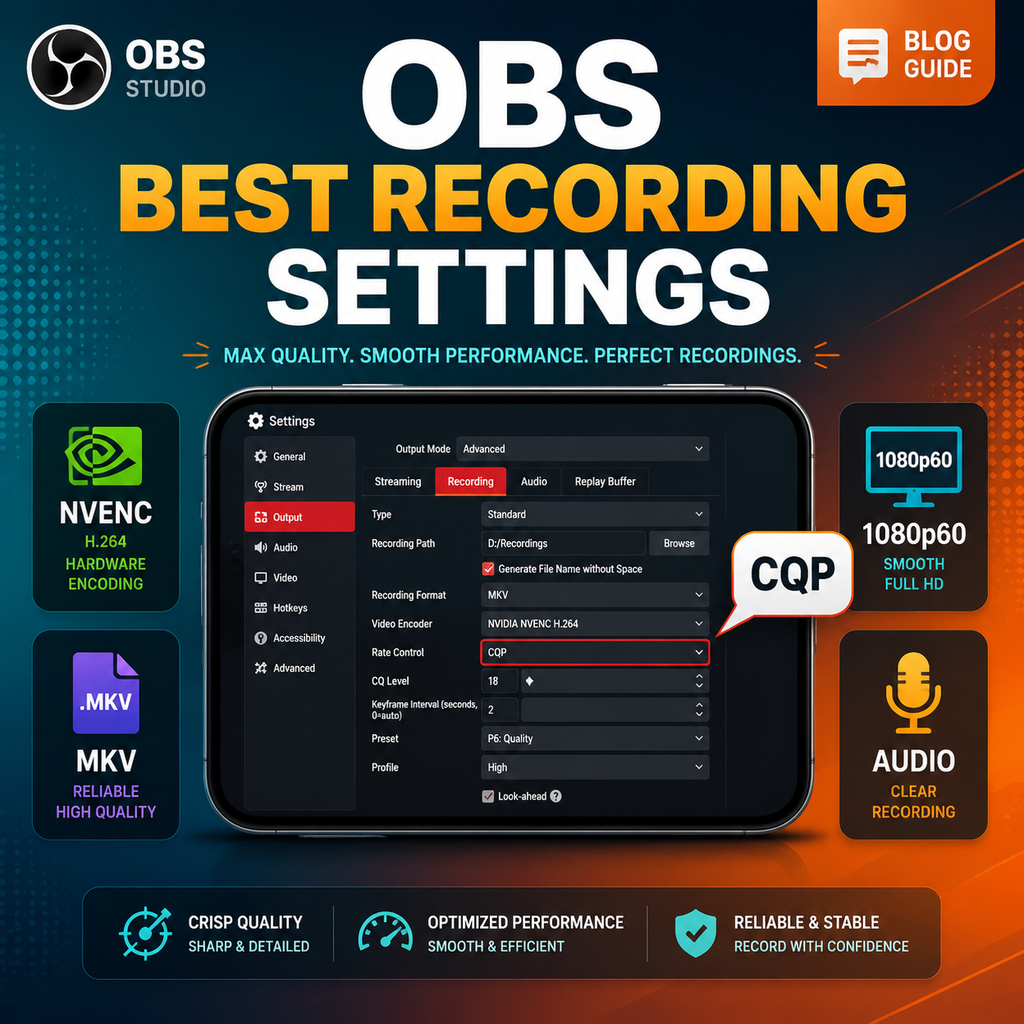
To unlock OBS's full recording potential, head to Settings > Output and change the Output Mode from Simple to Advanced. This reveals a suite of fine-grained controls for video encoding, audio tracks, and more. Once in Advanced mode, click the Recording tab to access the core settings that will define your recording quality and file size.

Choose the Right Recording Format

Your recording format determines compatibility and resilience. MKV is strongly recommended because it handles crashes gracefully—if OBS stops unexpectedly, your entire file won't corrupt. However, for editing convenience, you can automatically remux recordings to MP4. In the Advanced tab under Recording, check "Automatically remux to mp4." This way, OBS converts MKV to MP4 after each recording, giving you the best of both worlds: crash safety and broad software support.

Select the Optimal Video Encoder

Your video encoder choice depends on your GPU. For Nvidia users, select NVIDIA NVENC H.264 (or H.265/HEVC for better compression). AMD users should choose the AMD HW H.264 or H.265 equivalent. If you lack a dedicated GPU, use your CPU's integrated graphics: QuickSync for Intel, or AMD HW H.264 for AMD chips. NVENC offers excellent performance with minimal impact on your system, making it ideal for simultaneous gaming and recording.

Set Rate Control to CQP for Consistent Quality

For recording, use Constant Quantization Parameter (CQP) instead of Constant Bitrate (CBR). CQP ensures consistent visual quality across scenes by varying bitrate dynamically. Set the CQ Level between 16 and 20—lower numbers yield higher quality but larger files. A value of 18–20 is a sweet spot for 1080p60 recordings. If you need smaller files, avoid going above 22. This setting is the most impactful for balancing quality and file size.

Fine-Tune Encoder Settings for Performance

Keyframe Interval: Set to 2 for easier editing; 0 auto-selects but may cause issues. Preset: P5 is a balanced choice; use P7 for best quality on powerful GPUs, or drop to P5 if you encounter encoder overload. Tuning: High Quality. Multipass Mode: Full Resolution (or Quarter Resolution if your GPU struggles). Profile: High. Uncheck Look Ahead, keep Adaptive Quantization checked, and set B-frames to 2. These settings optimize NVENC for high-fidelity recordings.

Optimize Audio and Video Settings

Under Settings > Audio, set your desktop and microphone devices. For best audio quality, in the Output > Recording tab, set Audio Encoder to FFmpeg AAC and bitrate to 320 kbps for each track. If you need to split audio (e.g., separate game and mic tracks), enable multiple audio tracks and assign them in the Advanced Audio Properties. For video, set Base (Canvas) Resolution to your monitor's native resolution (e.g., 1920x1080) and Output (Scaled) Resolution to your desired recording resolution. Use 60 FPS for smooth gameplay. If resolutions differ, select Lanczos downscale filter for best quality.

Troubleshooting Common Recording Issues

If you experience stuttering or encoder overload, reduce the Preset to P5 or switch Multipass Mode to Single Pass. For integrated graphics users, lower the preset to Balanced or Speed. Also ensure your recording path is on a fast SSD, not an HDD, to prevent dropped frames. If game FPS drops, try lowering the CQ level slightly or reducing the resolution. Always test your settings with a short recording before a long session.

EXPLORE I AM PROVIDER

Your next service starts here.

Browse the complete service library, platform by platform.

Instagram20
Buy Instagram FollowersBuy Instagram Auto LikesBuy Instagram Auto Video ViewsBuy Instagram CommentsBuy Instagram EngagementsBuy Instagram ImpressionsBuy Instagram LikesBuy Instagram Live Stream ViewsBuy Instagram MembersBuy Instagram MentionsBuy Instagram Old Post LikesBuy Instagram Old Post ViewsBuy Instagram Profile VisitsBuy Instagram ReachesBuy Instagram SavesBuy Instagram SharesBuy Instagram Story LikesBuy Instagram Story SharesBuy Instagram Story ViewsBuy Instagram Video Views
TikTok15
Buy TikTok CommentsBuy TikTok DownloadsBuy TikTok FollowersBuy TikTok LikesBuy TikTok Live Stream CommentsBuy TikTok Live Stream LikesBuy TikTok Live Stream SharesBuy TikTok Live Stream ViewsBuy TikTok PK Battle PointsBuy TikTok SavesBuy TikTok SharesBuy TikTok Story LikesBuy TikTok Story SharesBuy TikTok Story ViewsBuy TikTok Video Views
YouTube9
Buy YouTube Auto CommentsBuy YouTube Auto LikesBuy YouTube Auto Video ViewsBuy YouTube Comment LikesBuy YouTube CommentsBuy YouTube LikesBuy YouTube SharesBuy YouTube SubscribersBuy YouTube Video Views
X (Twitter)14
Buy X (Twitter) BookmarksBuy X (Twitter) CommentsBuy X (Twitter) Detail ClicksBuy X (Twitter) FollowersBuy X (Twitter) ImpressionsBuy X (Twitter) LikesBuy X (Twitter) Link ClicksBuy X (Twitter) MentionsBuy X (Twitter) Pool VotesBuy X (Twitter) Post ViewsBuy X (Twitter) Profile ClicksBuy X (Twitter) RepostsBuy X (Twitter) Space listenersBuy X (Twitter) Video Views
Facebook12
Buy Facebook CommentsBuy Facebook FollowersBuy Facebook Friend RequestsBuy Facebook LikesBuy Facebook Live Stream ViewsBuy Facebook Page FollowsBuy Facebook Page LikesBuy Facebook Post LikesBuy Facebook Post ReactionsBuy Facebook Profile FollowsBuy Facebook Story ViewsBuy Facebook Video Views
Telegram3
Buy Telegram MembersBuy Telegram Post ViewsBuy Telegram Reactions
Twitch6
Buy Twitch Channel ViewsBuy Twitch Clip ViewsBuy Twitch FollowersBuy Twitch Live Stream ViewsBuy Twitch Prime SubscribersBuy Twitch Video Views
Spotify4
Buy Spotify FollowersBuy Spotify ListenersBuy Spotify PlaysBuy Spotify Saves
SoundCloud5
Buy SoundCloud CommentsBuy SoundCloud FollowersBuy SoundCloud LikesBuy SoundCloud PlaysBuy SoundCloud Reposts
Threads5
Buy Threads CommentsBuy Threads FollowersBuy Threads LikesBuy Threads RepostsBuy Threads Shares
Likee4
Buy Likee CommentsBuy Likee FollowersBuy Likee LikesBuy Likee Shares
Discord1
Buy Discord Members
Reddit6
Buy Reddit CommentsBuy Reddit FollowersBuy Reddit Post ViewsBuy Reddit SharesBuy Reddit SubscribesBuy Reddit Upvotes
Kick2
Buy Kick FollowersBuy Kick Live Stream Views
LinkedIn3
Buy LinkedIn FollowersBuy LinkedIn LikesBuy LinkedIn Video Views
Pinterest5
Buy Pinterest FollowersBuy Pinterest LikesBuy Pinterest RepinsBuy Pinterest SavesBuy Pinterest Shares
OnlyFans3
Buy OnlyFans CommentsBuy OnlyFans FollowersBuy OnlyFans Likes
Snapchat4
Buy Snapchat EngagementsBuy Snapchat FollowersBuy Snapchat Spotlight ViewsBuy Snapchat Story Views
Kwai5
Buy Kwai CommentsBuy Kwai FollowersBuy Kwai LikesBuy Kwai SharesBuy Kwai Video Downloads
Tumblr3
Buy Tumblr FollowersBuy Tumblr LikesBuy Tumblr Reblogs
Shopee1
Buy Shopee Live Stream Views
Trustpilot1
Buy Trustpilot Reviews
Quora5
Buy Quora Answer ViewsBuy Quora FollowersBuy Quora SharesBuy Quora UpvotesBuy Quora Views
Yandex Zen5
Buy Yandex Zen CommentsBuy Yandex Zen LikesBuy Yandex Zen ReadingsBuy Yandex Zen SubscribesBuy Yandex Zen Video Views
WhatsApp2
Buy WhatsApp Channel MembersBuy WhatsApp Channel Post Reactions
Vimeo2
Buy Vimeo FollowersBuy Vimeo Likes
More services1
Buy Yandex Music Plays

Tools for your next post

Prepare text, plan content and work out your next campaign.

Explore free tools

Free service requests

Choose a free reward of up to 100 units when its window is open. Availability and fulfilment times vary.

Browse all free service requests
HERE TO HELP

Contact us

Choose how to reach our team.

Find your next page

Tab to select · Enter to open · Esc to close