YouTube Communities: A New Era of Creator-Fan Interaction
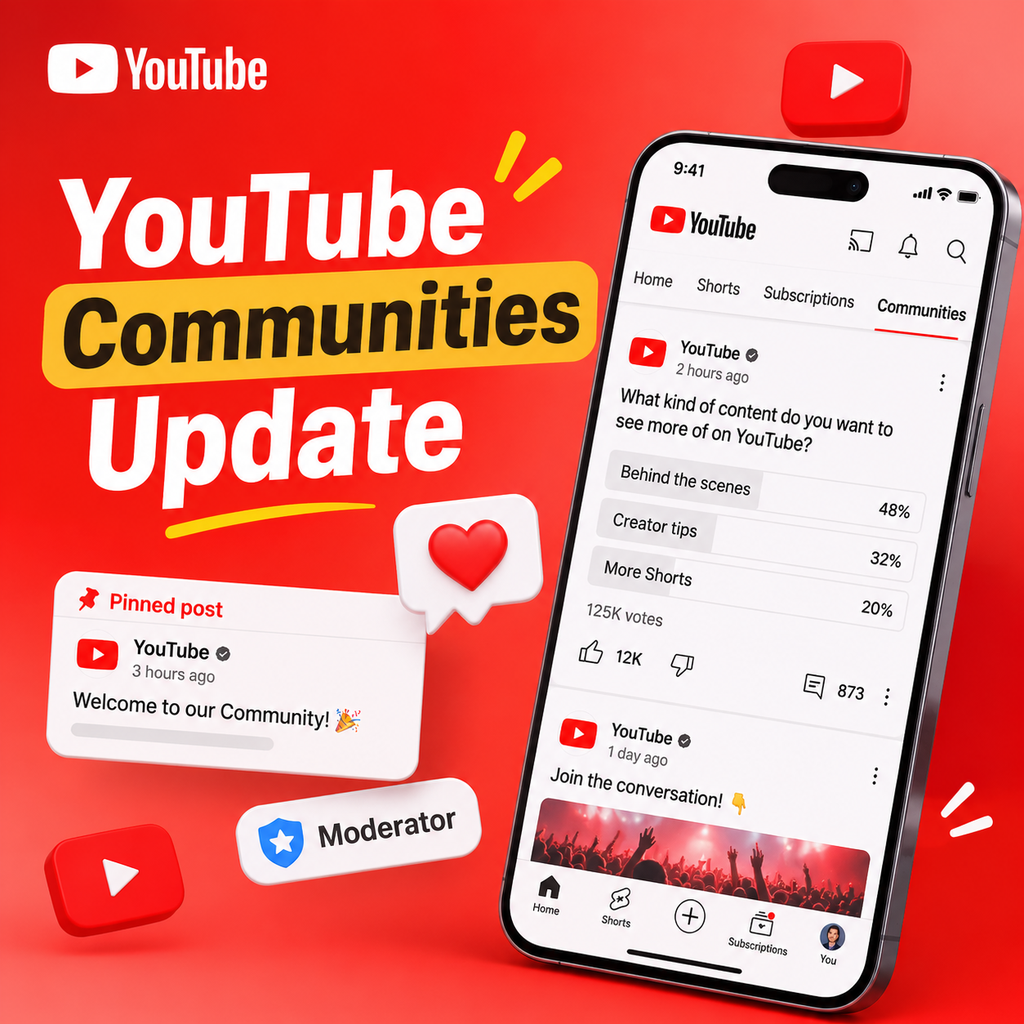
YouTube's latest update is all about bringing creators and viewers closer together. The platform has rolled out its "Communities" feature to more creators, transforming how fans engage with their favorite channels. Think of Communities as a dedicated space on a creator's channel where subscribers can start conversations, share fan art, post polls, and connect with like-minded individuals—all without the pressure of waiting for the next video upload. It's a game-changer for community building, and it's now available on mobile devices for a growing number of creators.
If you're a creator looking to foster deeper connections with your audience, or a fan eager to interact with your favorite YouTuber, this update is worth exploring. Let's dive into what's new and how you can make the most of it.
What Are YouTube Communities?
YouTube Communities are essentially dedicated discussion boards linked from a creator's channel. They allow both the creator and subscribers to initiate and participate in conversations. Unlike the traditional comments section, which is tied to specific videos, Communities are a continuous space where topics can flow organically and build over time. Subscribers can post text, images, and polls, and creators have full moderation control to keep the space safe and welcoming. The feature was first announced at Made on YouTube 2024 and has been gradually expanding ever since.


Key Features at a Glance
- Fan-initiated conversations: Subscribers can start discussions, ask questions, and share content.
- Creator moderation: Creators can set rules, approve posts, and manage who can participate.
- Dedicated space: Communities live on a separate tab, making it easy for fans to find and engage.
- Mobile-first: Initially available on Android and iOS, with desktop support rolling out later.
This shift marks a significant move towards more social, community-driven experiences on YouTube, giving creators a new way to interact with their audience beyond video uploads.
Expanding Access: Who Can Use Communities?
When Communities first launched, it was limited to a small group of testers. But as of early 2025, YouTube has been inviting more creators to enable the feature. According to the latest updates, any creator with access to Posts (formerly the Community tab) can opt in. Invitations are being sent via email and through a banner on channel pages on mobile. If you're eligible, you'll see a "Go to Community" prompt on your channel—just tap it to learn more and decide whether to turn it on.
For fans, accessing a Community is straightforward. You need to be subscribed to the channel for at least a day (or a week, depending on the creator's settings) before you can post. This helps creators maintain a sense of exclusivity and ensure that participants are genuinely interested in the community.
What About Desktop?
Initially, Communities were mobile-only, but YouTube has been listening to feedback. As of November 2025, Communities are now available on desktop as well. Creators and viewers can view, post, and engage with Communities content directly from their computers. Creators can also access moderation settings and manage posts from the desktop version. This cross-platform expansion makes it easier for everyone to stay connected, regardless of device.
New Features for Creators
With the expansion, YouTube has introduced a suite of tools to help creators manage their Communities more efficiently. Here's what's new:
- Community-only posts: Share updates exclusively with your Community members. These posts won't appear on your standard public Posts tab, giving you a way to communicate privately with your most engaged fans.
- Enhanced moderation in Studio: You can now pin posts, reply to viewers, and multi-select viewer posts to approve, delete, or report them in bulk—all within YouTube Studio. This saves time and makes moderation scalable.
- Quick mod assignments and alerts: Use the three-dot menu on any Community post to instantly add a moderator or approved user. New moderators receive a notification and a custom profile badge, recognizing their role.
- Pinned posts: Creators can pin a post to the top of their Community to set the tone, highlight announcements, or welcome new members.
- Creator hearts: On mobile, creators can "heart" viewer posts to show appreciation and recognition, similar to other social platforms.
- Shareable Community links: Creators can now share a direct link to their Community via the three-dot menu, making it easy to invite others from social channels.
These features are designed to give creators more control and flexibility while fostering a vibrant and engaged community.
What's New for Fans
Fans aren't left out—YouTube has rolled out several updates to enhance the viewer experience within Communities:
- Quote creator posts: You can now quote a creator's original text or image post directly into a new post within the Community. This sparks discussions and lets you add your own commentary. Note that quoting is currently only available for creator posts, not other fans' posts.
- New ways to discover Communities: Communities are now easier to find. You can jump into a Community from your mobile search results, and a new Spotlight Card in the YouTube Music mobile app directs you to relevant Communities.
- New notifications: Get alerts when a creator interacts with your posts—like when they pin your post or give it a heart. This real-time feedback makes engagement more rewarding.
- Community-only posts: As a fan, you'll see these exclusive posts in the Community page and potentially in your Home, Watch, or Subscriptions feed, giving you insider access to updates.
These features make it easier for fans to stay connected, discover new Communities, and feel acknowledged by creators.
What Else You Need to Know
Before you jump in, here are a few important details:
- Eligibility for posting: You must be subscribed to the channel for at least 1 day or 7 days (creator's choice) to post in a Community. This waiting period helps creators manage spam and ensure quality interactions.
- Moderation remains key: Creators have access to various moderation settings, including "Hold All" to review posts before they appear. Moderators can also be assigned to help manage the space.
- Communities vs. Posts: The old "Community" tab has been renamed to "Posts" to avoid confusion. The new Communities are a separate, dedicated space for discussions, while Posts remain for announcements and updates.
- Availability: Communities are currently available on mobile (Android and iOS) and desktop. YouTube Music also has a Spotlight Card for Communities.
- Future updates: YouTube plans to continue improving the feature based on feedback. So expect more tools and enhancements in the future.
Understanding these nuances will help you navigate the new feature smoothly.
How to Enable or Join a Community
For creators, enabling Communities is straightforward. If you're eligible, you'll receive a notification via email and a banner on your channel page. Tap "Go to Community" to get started. You can also enable it through YouTube Studio by going to the Community settings. Once enabled, you can customize moderation settings, invite moderators, and start engaging with your fans.
For fans, joining a Community is as simple as visiting a creator's channel and tapping the "Community" tab. You'll need to be subscribed for the required period before you can post or comment. Once you're in, you can start conversations, quote creator posts, and interact with other fans. You can also share the Community link with friends to grow the space.
Remember, if you ever want to turn off Communities as a creator, you can do so in the settings. And as a fan, you can leave a Community at any time.
The Future of YouTube Communities
Looking ahead, YouTube Communities are poised to become an integral part of the platform. With the recent updates, YouTube is clearly investing in tools that empower creators to build thriving communities and give fans a sense of belonging. The emphasis on moderation, exclusive posts, and seamless discovery suggests that Communities will continue to evolve, possibly integrating more features like live chats, collaborative posts, or even monetization options.
For creators, this is an opportunity to deepen relationships with their audience, reduce the pressure to constantly produce videos, and create a self-sustaining community. For fans, it's a chance to connect with creators and fellow fans in meaningful ways, beyond just watching videos.
As YouTube continues to roll out Communities to more creators and devices, we can expect the feature to become a central hub for interaction. So whether you're a creator looking to foster a loyal community or a fan wanting to get closer to your favorite channel, now is the time to explore YouTube Communities. Dive in, start a conversation, and be part of the next wave of social engagement on YouTube.
 Русский
 Turkish
 Português (Brasil)
 한국어
 العربية
 Español
 ไทย
 Tiếng Việt
 Français
 中文
 Deutsch
 Bahasa Indonesia
 Italiano
 日本語
 Polski
 Українська
 فارسی


